
Mac folder organizer

Organize your Mac. Review every move.

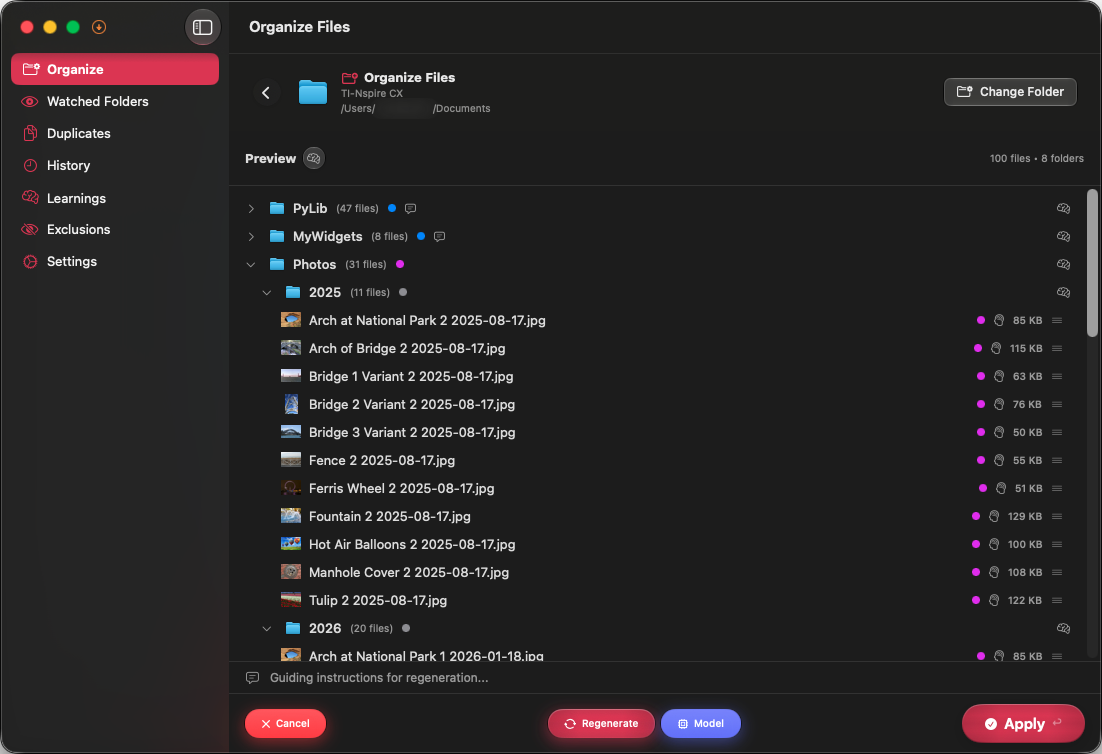
Sorty is a native macOS app for people who want AI-assisted file organization without giving up control. It proposes folders and file moves, then waits for approval before changing anything.

Free · GPL v3 · macOS 15+ · Apple Silicon and Intel

Sorty on macOS showing a preview of proposed folders and file moves before the user applies them.

How it works

From folder to reviewed plan in three steps

Follow the connected path. Each step appears as you reach it.

  1. 1

    Choose any folder

    Select a folder in Sorty or start from Finder. Sorty can work with local folders, external drives, iCloud Drive, and Dropbox folders that macOS lets you access.

  2. 2

    Generate an organization plan

    Your chosen AI provider uses the available file names, types, dates, folder context, and optional Deep Scan information to propose meaningful destinations.

  3. 3

    Review, edit, and apply

    Inspect every proposed move before it happens. Adjust the plan, apply it when ready, and reverse an organization later from History if needed.

Built for repeatable Mac workflows

Use the Finder extension to start from a folder, save personas for different kinds of work, or add a watched folder for recurring organization. Sorty also learns from accepted placements and corrections so future suggestions can better match your preferences.

Privacy depends on the provider you choose

Sorty has no account system and no developer-operated service that receives your folder data. With Ollama or supported Apple on-device models, processing can stay on your Mac. If you choose a cloud provider, relevant metadata goes directly to that provider. Optional content is included only when Deep Scan is enabled.